Ask a treasury team how to reverse a payment in SAP and you will usually get a pause, then a question back: "How was it created, and has it gone to the bank yet?"
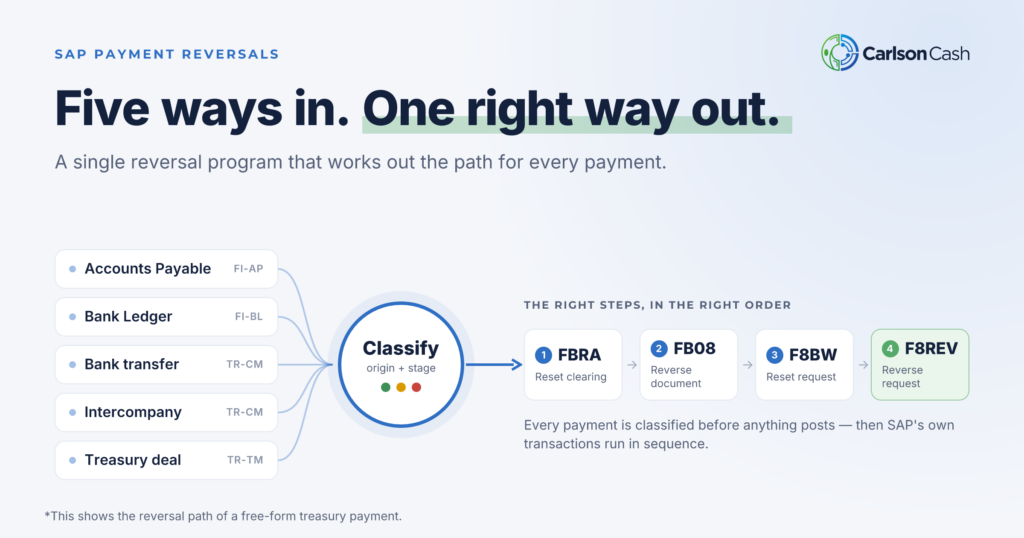
That pause is the problem. Reversing a payment is rarely one transaction. It is a sequence, and the right sequence depends on where the payment came from and how far it has traveled. We built a single reversal program that works this out for you and runs the correct steps in the correct order.
Why payment reversals are so hard
A reversal is cumbersome because two independent questions decide what you have to do, and SAP gives you no single place to answer either one.
Question 1: How was the payment created?
The origin of the payment determines which transactions you run and in what order. Get the order wrong and you can leave the books and the payment request out of step.
| Payment origin | Typical source | Reversal steps |
|---|---|---|
| Accounts Payable (FI-AP) | Supplier payment run (F110) | Reset clearing (FBRA), then reverse the document (FB08) |
| Bank Ledger (FI-BL) | Repetitive or free-form payment request | FBRA, FB08, reset the payment request (F8BW), then reverse the request (F8REV) |
| Cash Management bank transfer, same company code (TR-CM-BT) | Bank-to-bank transfer | Reverse the document (FB08), reset the request (F8BW), reverse the bank-to-bank transfer (F8BV) |
| Cash Management bank transfer, cross-company (TR-CM-BT) | Intercompany bank-to-bank transfer | Cross-company reversal (FBU8), then F8BW and F8BV against the receiving company code’s document |
| Treasury and Risk Management (TR-TM) | Financial transaction settlement | FBRA, FB08, F8BW, then reverse the deal-side flows in TRM |
Even experienced users trip over the details. FBRA quietly declines on a bank transfer because that document never cleared anything. A cross-company transfer looks like an ordinary FB08 until SAP rejects it. The payment request for an intercompany transfer hangs off the receiving company’s document, not the paying one.
Question 2: How far has the payment traveled?
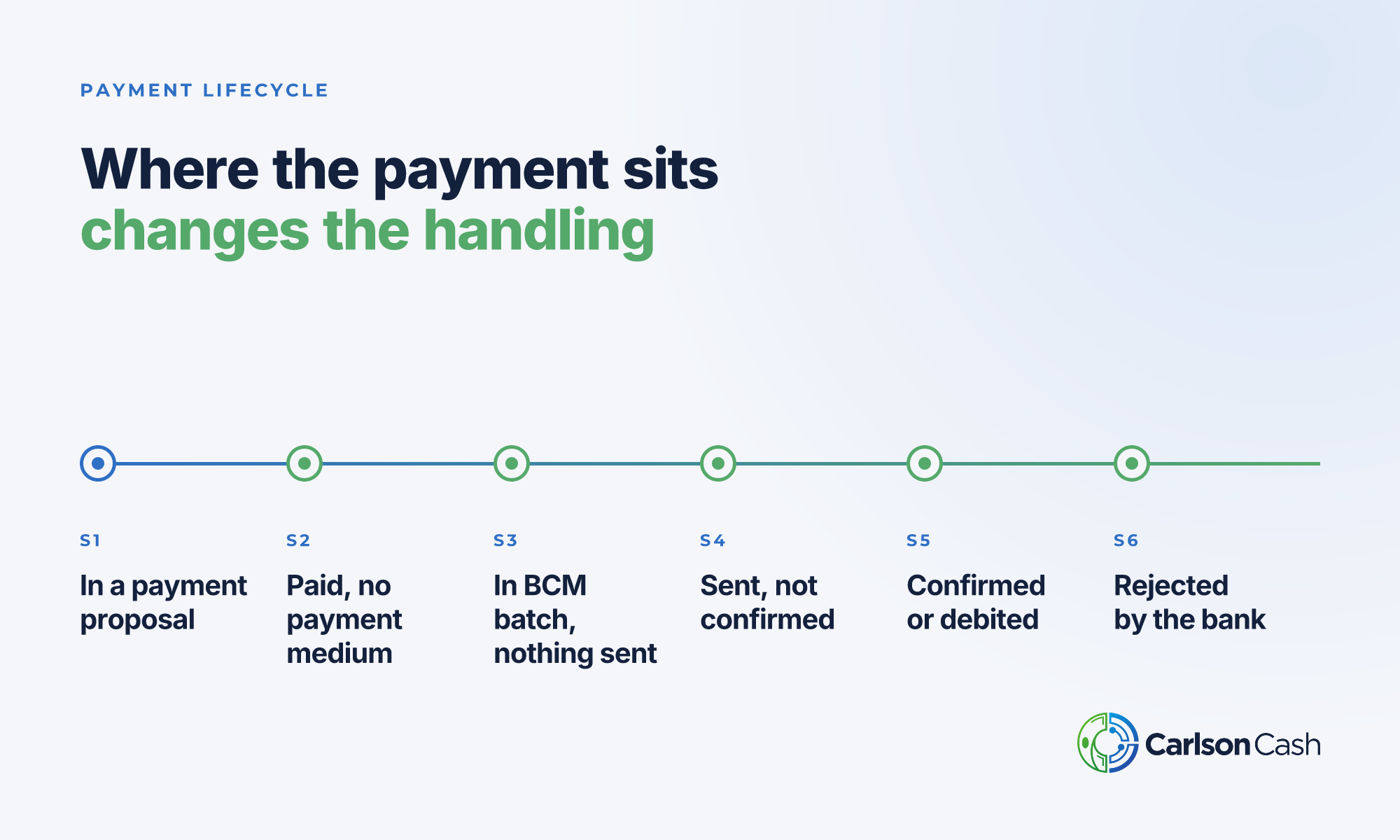
The same payment needs different handling depending on where it sits in its lifecycle. Reversing the books is safe before a file reaches the bank and risky after.
- In a payment proposal. No document posted yet. Remove it from the proposal; there is nothing to reverse.
- Paid, no payment medium. The document exists but no file has been created. Reset and reverse.
- In a BCM batch, nothing sent. The batch exists inside SAP. Reset and reverse; the batch is left alone.
- Sent to the bank, not confirmed. The file has left SAP. You can reverse the books, but you may also need to recall the payment with the bank.
- Confirmed or debited. The money has moved. A book reversal on its own creates a gap between the books and the bank account.
- Rejected by the bank. The bank returned it. Reset and reverse so the open item reappears.
What goes wrong today
Put those two questions together and a single reversal can mean four transactions across three different areas of SAP. In practice that leads to:
- Half-reversed payments. The FI document is reversed but the payment request is still open, so the item can be paid again.
- Silent failures. A step returns a warning nobody reads, and the next step runs on a document that was never reset.
- Reversals after the money left. Someone reverses a payment that the bank already debited, and the books no longer match the bank.
- Tribal knowledge. The correct sequence lives in one person’s head or a stale work instruction.
One program that knows the path
We built a comprehensive reversal program that answers both questions automatically for every payment, then runs the right chain of transactions. The user selects payments and presses Reverse. The program works out the rest.
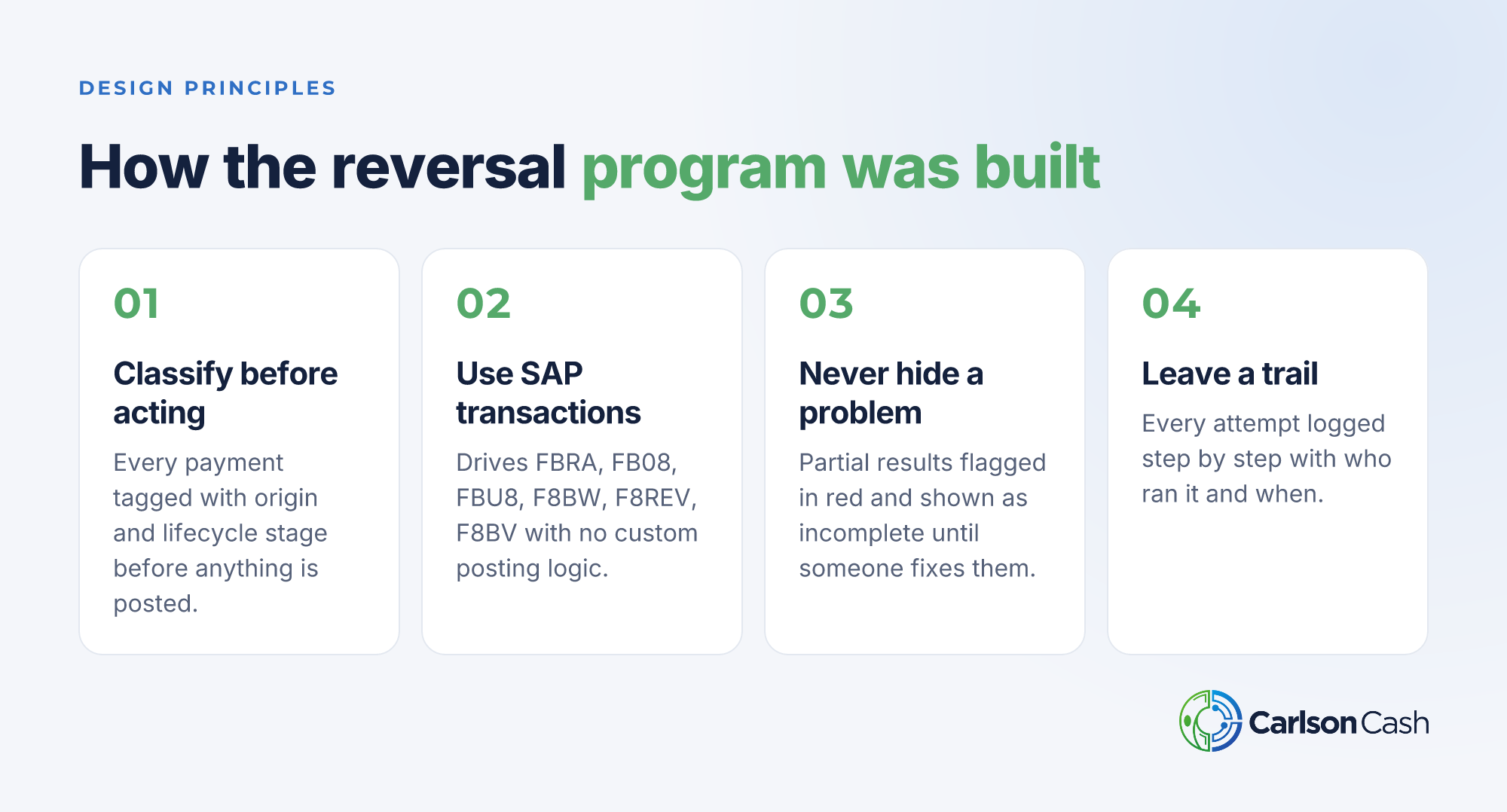
It was designed around four principles, shown above. The one that matters most to SAP teams: the program drives SAP’s own standard transactions, with no custom posting logic, so standard validations and document flow stay intact.
How the program works
The program runs in six steps: select, classify, review, simulate, reverse, and audit. Simulation is the default, so nothing posts until the user deliberately switches it off.
Step 1: Select the payments
The selection screen is organized into four blocks:
- Scope. Company code (required), house bank, account ID, payment method and currency, plus a choice of all payments, Treasury only, or Accounts Payable only.
- Payment identification. Payment run date and ID, payment document, supplier, amount and posting date.
- Status filter. Limit to specific lifecycle stages (S1 to S6), and optionally hide payments that are already reversed.
- Execution control. Simulate only (on by default), reversal reason, reversal posting date, an acknowledgement for payments already sent to or debited by the bank, and an option to run the transactions in the foreground for troubleshooting.

Step 2: The program classifies every payment
For each payment, the program reads the payment run, the FI document, the BCM batch status and the payment request, then tags the payment with two things:
- Origin. Read from the payment’s origin key. TR-TM, FI-BL and TR-CM-BT payments are treated as Treasury; everything else is Accounts Payable. It also detects cross-company bank transfers from the document’s intercompany transaction number.
- Lifecycle stage. Derived from whether a document exists and from the BCM batch item status. For example, "Payment Medium Created" counts as sent to the bank, because the file has left SAP even if the bank never acknowledges it.
The program reads BCM but never changes it. Batches are not voided or altered.
Step 3: Review the results
The output is a single list with one row per payment document. Each row shows the origin, the stage, a plain-language stage description, the recommended action, whether it can be reversed, and if not, why.
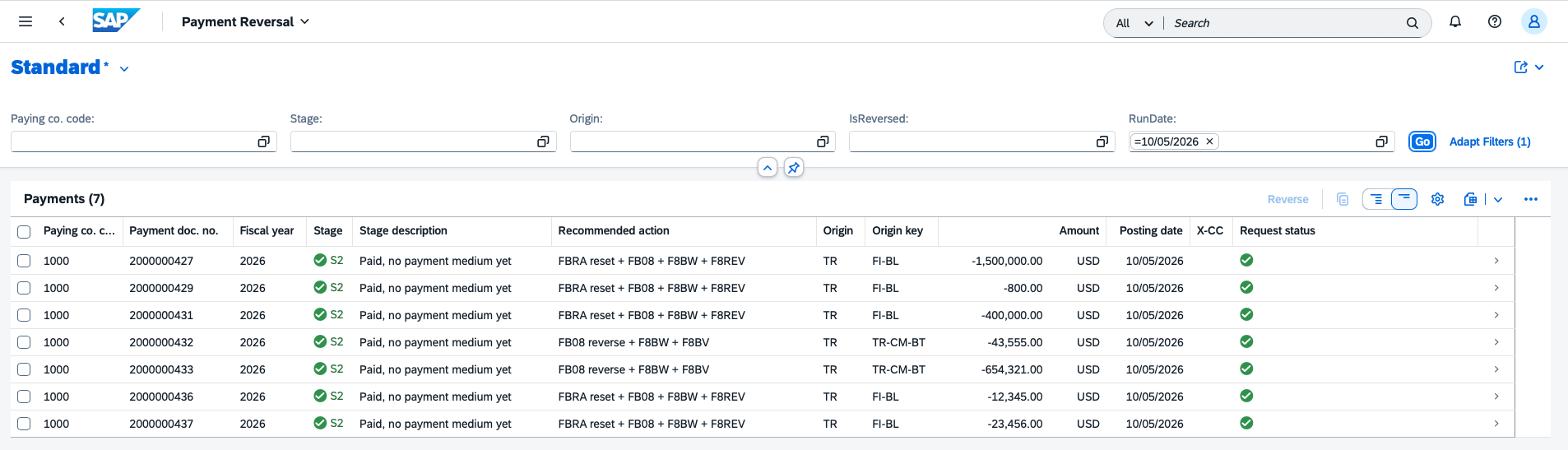
A traffic light on every row answers one question: can I act on this?
| Light | Meaning |
|---|---|
| Green | Ready to reverse |
| Amber | Sent to the bank and not yet confirmed; reversal possible but a recall may be needed |
| Red | Cannot or should not reverse: already debited by the bank, half-reversed, missing payment request, or another hard block |
| None | Already reversed cleanly; nothing to do |
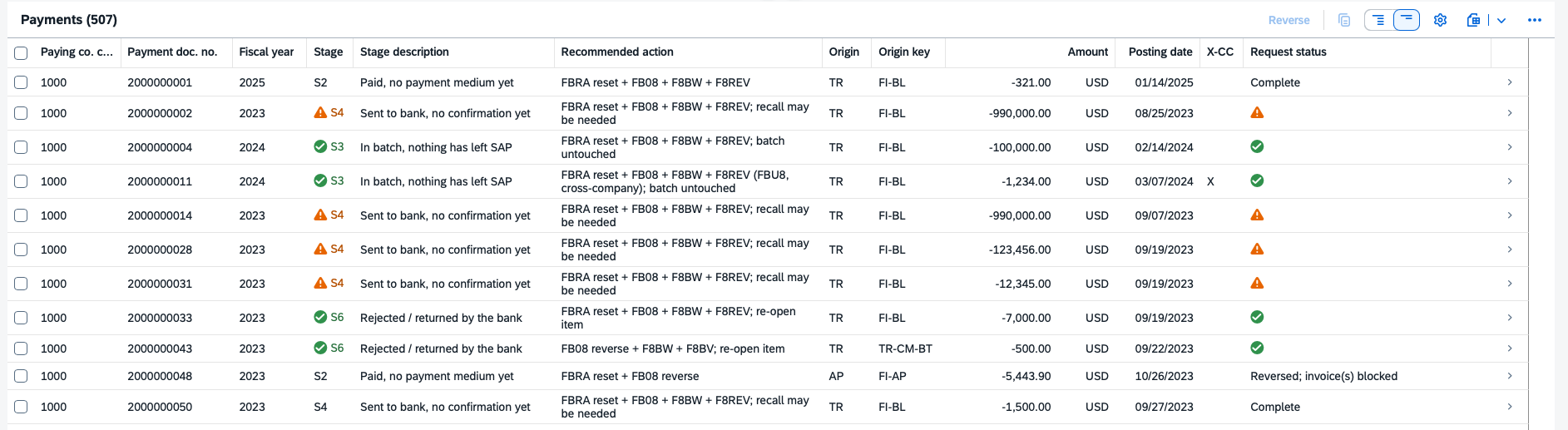
Drill into any row to see the details behind its stage. The screenshot below shows an item in Stage 3: in a batch, nothing has left SAP.
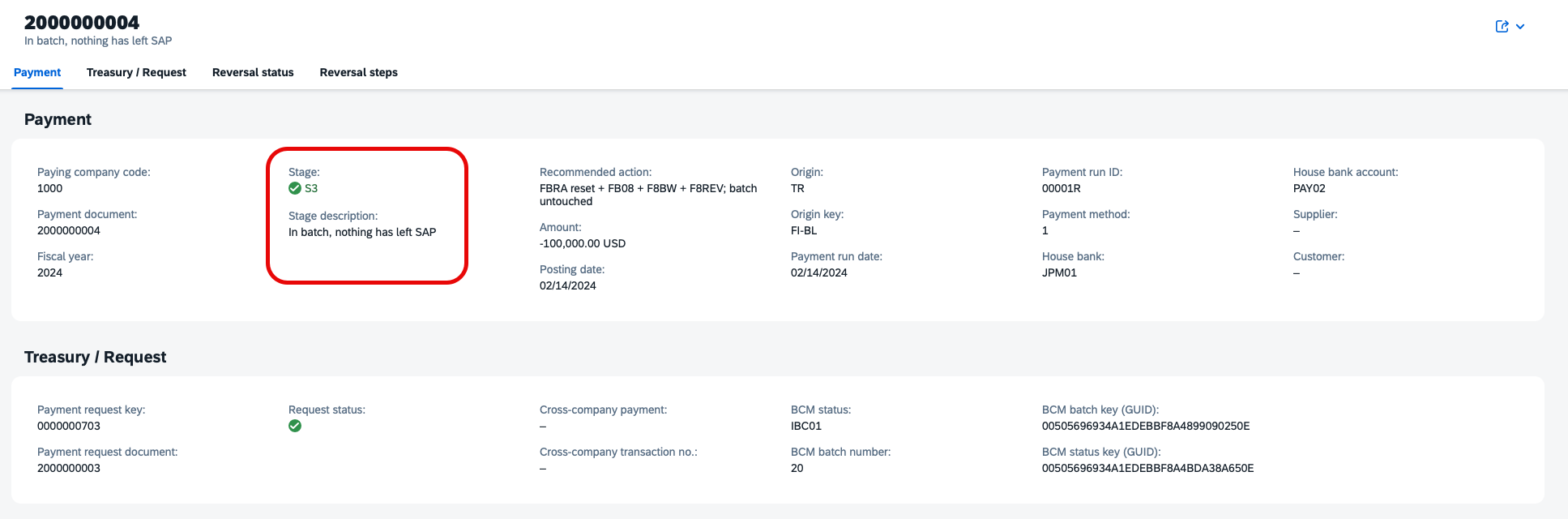
Step 4: Simulate
With "Simulate only" ticked, the user selects rows and presses Reverse. The program runs every check and fills the Result column with SIMULATED, but posts nothing. This is the safe way to confirm what will happen before committing.
Step 5: Reverse
The user goes back, clears "Simulate only", enters a reversal reason and posting date, selects the payments and presses Reverse. For each row the program runs the transaction chain that matches its origin, checking every message each transaction returns. Any error stops that payment’s chain and is reported; the next payment is processed independently.
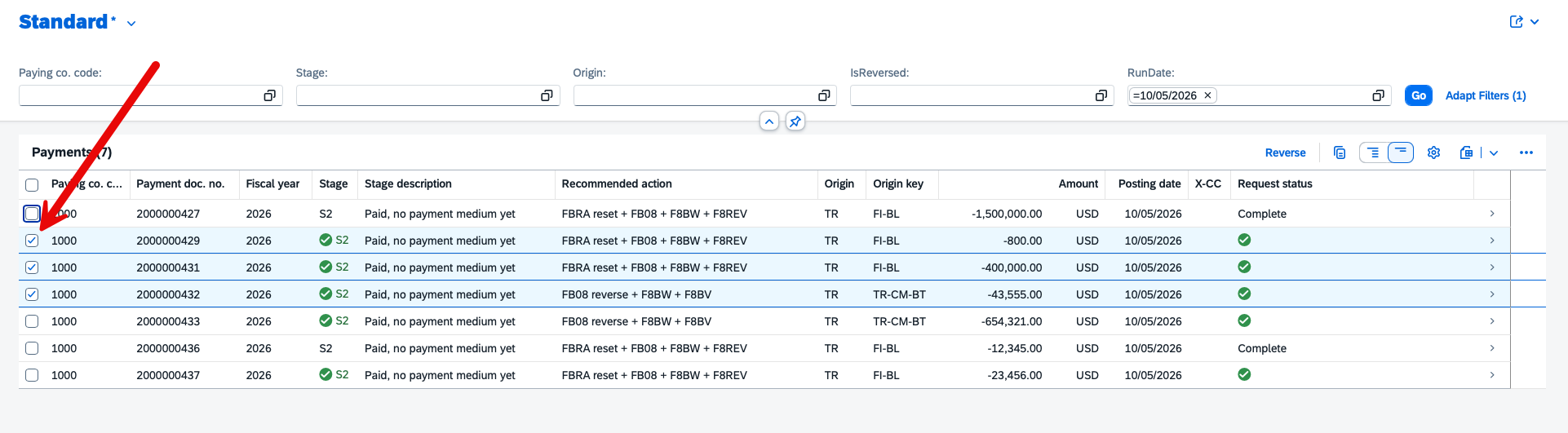
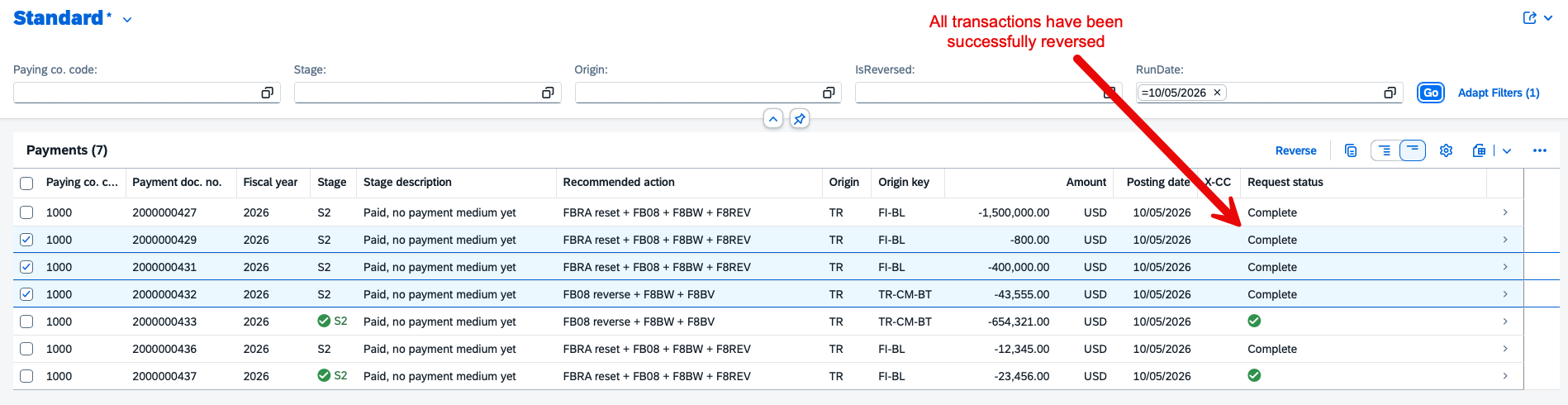
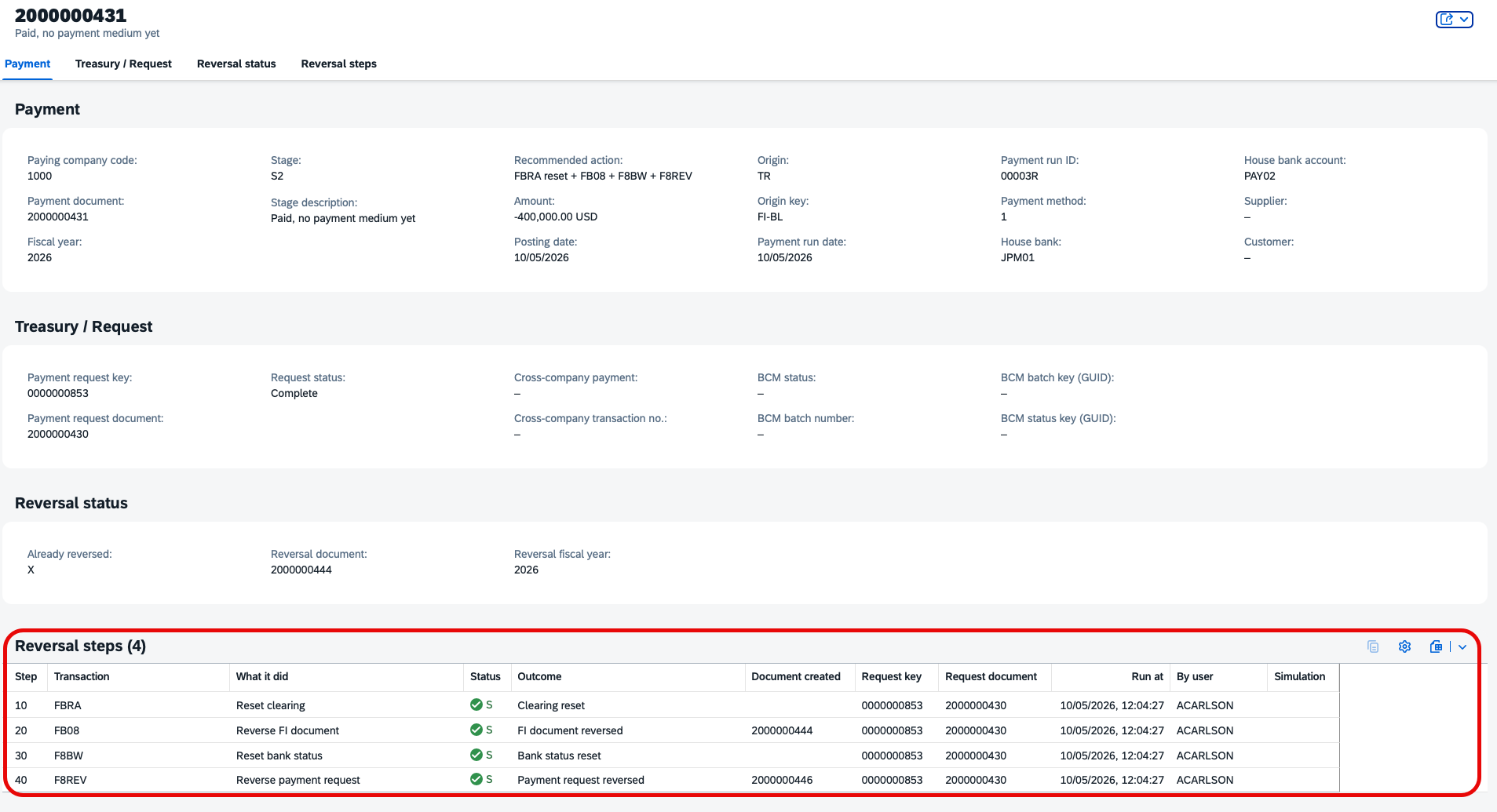
Running the program again is safe. A payment that is already reversed shows its reversal document and a blank light, and the program will not try to reverse it twice. Each payment’s full history is one click away in its row.

Step 6: Audit every attempt
Every reversal attempt, successful or not, writes a row to a custom log table. Each row records the payment, the user, the date and time, the reason, the overall result, and a status for each individual step (reset, document reversal, request reset, request reversal), so you can see exactly where a reversal stopped.
The result
What used to be a lookup, a decision and up to four transactions per payment is now a review and a single button. Users see the origin and stage of every payment up front, simulate before posting, and get a clear result for every reversal, with a log that shows exactly what happened.
If reversals are slowing down your treasury or AP team, or you have half-reversed payments you are not sure how to unwind, we would be glad to talk. We can build this same program for your SAP system.
Talk to us about your reversals.
About Carlson Cash
SAP Treasury experts. We wrote the book.
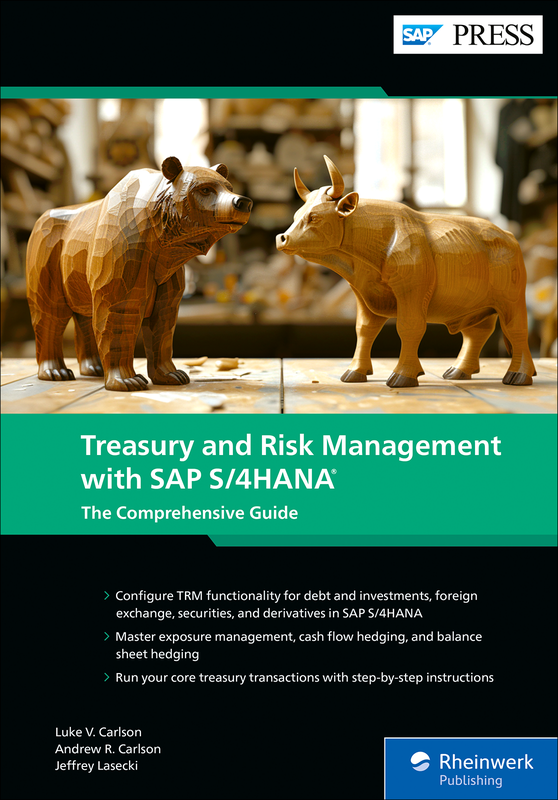
Since 2017, we’ve had one focus: getting SAP Treasury right the first time. We’re hands-on treasury experts who’ve worked on both sides of the table, in consulting and in industry, with no outsourcing and no bloated teams. We wrote the SAP PRESS book Treasury and Risk Management with SAP S/4HANA, have led 50+ SAP treasury implementations across North America and Europe, and partner with global enterprises, Fortune 100 companies and public sector leaders. We’re often brought in to fix implementations others couldn’t.